 Spokeninbox
Articles
Turn a web article into audio
Links and pasted text · Updated October 2026
The short answer. In Spokeninbox, open Add, paste the article's link and check the text it pulls in. Save it, then press Play. This works in the web app and the Mac and Windows apps, and the first 60 minutes each month are free. Paywalls and sign-in pages don't work, but you can paste text you can read.
How to turn an article into audio
Articles go into the same inbox as your newsletters. Nothing gets installed in your browser.
1. Open Add
Sign in at app.spokeninbox.com and choose Add at the top. Article link is already selected.
2. Paste the link
Paste the article's address and press Preview article. Spokeninbox fetches the page and pulls out its text. It takes a few seconds.
3. Check the text
You see the title and the full text before anything is saved. Many sites put a date, a byline or a list of sections above the story. Delete those lines and anything else you don't want to hear, because only the text in the box is read aloud. Then pick English, Spanish or Russian under Reading language.
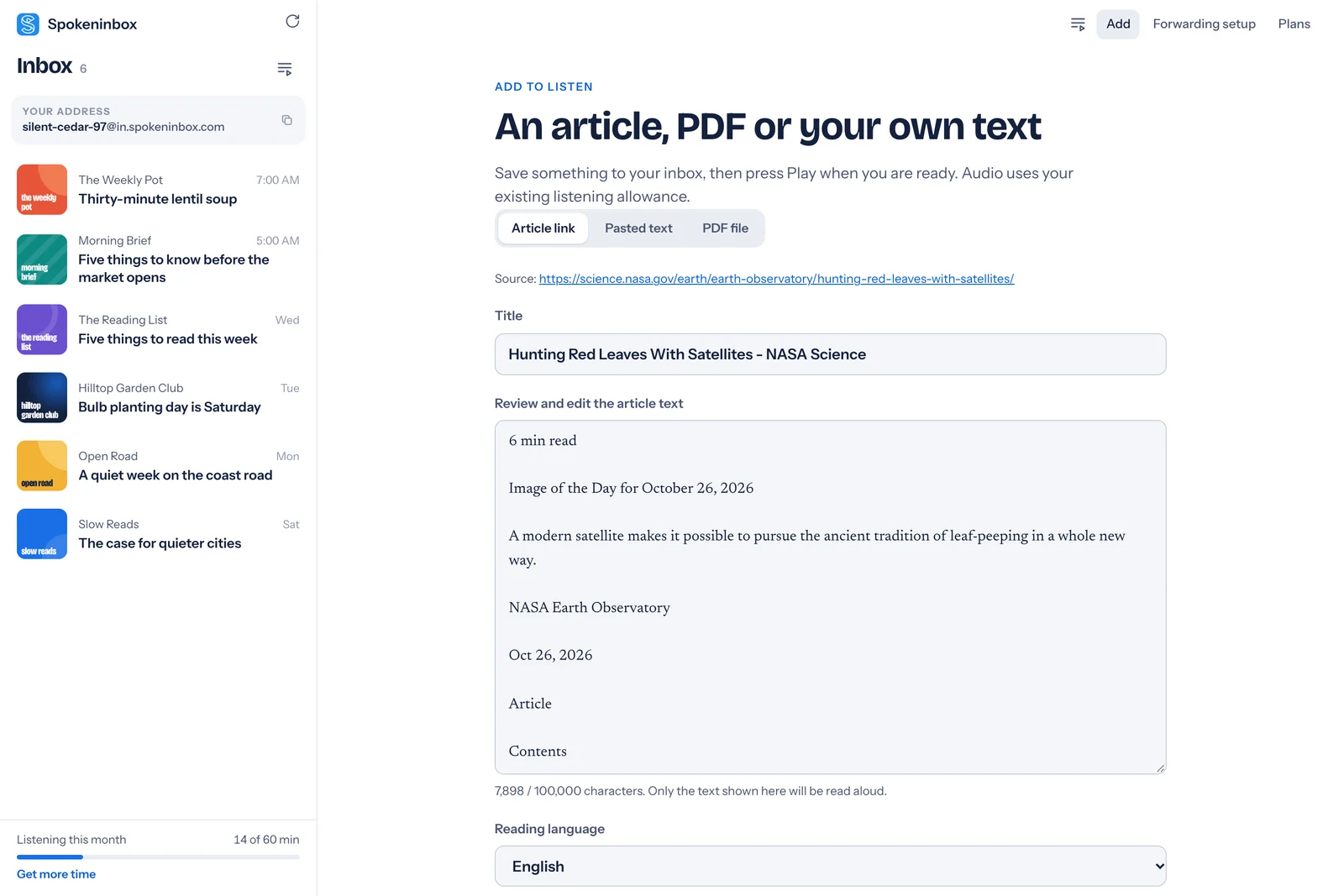
4. Save and press Play
Choose Save to inbox. The article opens like any email, with its own cover. Press Play when you're ready. The audio is made at that moment and counts toward your monthly minutes. Saving costs nothing.
On a phone, add articles in the web app in your browser. The iPhone app can't add them yet.
Which articles work
- Public pages. News stories, blog posts and anything else you can open without signing in.
- Not paywalls or sign-in pages. Spokeninbox fetches the page from its own servers, without your cookies or logins, so it gets what a signed-out visitor gets. If you can read the article, copy the text and paste it.
- Not always pages that load their text later. Some sites build the article with JavaScript after the page opens. Those can come back short or empty. Paste the text instead.
- Text only. Photos and charts aren't described.
- Long reads fit. One item holds up to 100,000 characters, about 110 minutes of listening.
- English, Spanish and Russian. Each has its own voice.
Listen to several articles in a row
Save a few articles, open each one and choose Add to queue. On the Up next page you can drag them into order. With Autoplay the next item turned on, the next article starts when one ends, so a reading list plays through on a walk without touching the screen. The queue stays in the browser or app where you made it.
Paste text instead
Choose Pasted text to hear anything you can copy. That covers an article from a site you subscribe to, a long message or a draft of your own. Give it a title, pick the language and save. Spokeninbox reads exactly what you pasted.
Other ways to hear an article
For a single page you have open right now, the tools on your device may be enough:
- Microsoft Edge has Read aloud built in. Press Ctrl+Shift+U, or Cmd+Shift+U on a Mac.
- iPhone and iPad. Speak Screen reads what's on the screen, including a page in Safari.
- Mac. Speak selection reads text you select.
- Android. Select to Speak reads text on the screen.
These read one page while it's open in front of you. Spokeninbox keeps the article in your inbox, remembers where you stopped on that device and plays several in a row. For PDFs, see PDF to audio. For ebooks and scanned pages, a general reader like ElevenReader or Speechify fits better.
Hear an imported article
The start of a NASA Earth Observatory article, imported from its link and read by Spokeninbox. No sign-in needed.
Listen: Hunting Red Leaves with Satellites
English voice, 1 minute. Imported from the article link on October 29, 2026, with the date and contents list deleted in the review step. Download MP3.
Read the sample transcript
The Japanese tradition of momijigari, or "red leaf hunting," stretches back more than a millennium, as evidenced by ancient poems describing journeys to admire fall foliage. In America, mentions of foliage trips began appearing in the historical record in the 19th century, around the time artists and poets such as Frederic Church and Emily Dickinson celebrated autumn color in depictions of the Northeast.
Modern-day leaf peepers have a new way to track and savor the seasonal phenomenon. The hyperspectral OCI (Ocean Color Instrument) on NASA's PACE (Plankton, Aerosol, Cloud, ocean Ecosystem) satellite observes the planet's oceans and vegetation daily at 286 spectral bands. Among this array are a few groups of wavelengths that allow scientists to track subtle changes in leaf pigments key to fall foliage displays, including anthocyanins (reds), carotenoids (yellows and oranges), and chlorophylls (greens).
Open Spokeninbox in your browser. No download needed. You get 1 hour free each month; paid plans start at $9.99 a month.
Add an article in your browser →Questions
Can I turn a web article into audio?
Yes. In Spokeninbox, choose Add, paste the article's link, check the text and save it. Press Play to hear it. It works in the web app and the Mac and Windows apps, with 60 free minutes a month.
Does it work with paywalled articles?
No. Spokeninbox fetches the page without your logins or cookies, so it can't see text behind a paywall or sign-in. If you can read the article, copy its text and use Pasted text instead.
Can I listen to several articles in a row?
Yes, in the web app and the Mac and Windows apps. Open each saved article, choose Add to queue, and turn on Autoplay the next item on the Up next page. The queue stays in that browser or app.
Which languages can it read?
English, Spanish and Russian. You pick the reading language before you save.
Is it free?
Saving articles is free. Listening uses your monthly minutes: 60 free minutes a month, and paid plans from $9.99 a month.
Still stuck? The support page has more help.