 Spokeninbox
EPUB to audiobook
Updated
Our two full-length novels came to 10 and 13 hours of audio. ElevenReader reads 10 hours a month free in its app. A converter such as Audiobook Maker makes MP3 or M4B files. Spokeninbox makes one item per chapter, for its apps or your podcast app, and The Adventures of Sherlock Holmes fits in one month of Pro at $19.99. Every route needs an EPUB without copy protection.
How long an EPUB audiobook is, and what it costs
A full-length novel runs 10 to 13 hours as audio, and a short one under 3. We got these listening times in Spokeninbox for three free Project Gutenberg EPUBs, counting the chapters only. The front pages, the Pride and Prejudice preface and the Project Gutenberg license add 20 to 50 minutes if you keep them.
| Book | Chapters | Listening time | Plan that covers it in one month |
|---|---|---|---|
| Alice's Adventures in Wonderland | 12 chapters, 10 to 15 minutes each | 2 hours 40 minutes | Plus. The free hour covers chapters I to IV. |
| The Adventures of Sherlock Holmes | 12 stories in 15 items, 42 to 60 minutes a story | 10 hours 25 minutes | Pro. Plus covers all but the last story. |
| Pride and Prejudice | 61 chapters, 4 to 32 minutes each | 12 hours 45 minutes | Pro |
Plus is $9.99 a month for 10 hours, and Pro $19.99 for 25 hours. Saving a book costs nothing. When you play in the app, audio is made as you listen, one part ahead, and counts when it's made, so a chapter you never play in the app never counts, and a long book can spread over several months.
Which way to turn an EPUB into audio
Use a converter if you want files to keep, and an app if you only want to listen. Costs are for The Adventures of Sherlock Holmes, at 10 hours 25 minutes.
| Option | What you end up with | Cost for this novel |
|---|---|---|
 Apple Books with Speak Screen | Your iPhone reads the open page aloud | $0 |
 ElevenReader | Listening in its app | $0 for nearly all of it, with 10 free hours a month |
 Speechify | Listening in its app | $29 for a month of Speechify Premium |
 Audiobook Maker | MP3 or M4B files with chapters | $0 with standard voices |
 Spokeninbox | One item per chapter, plus an optional podcast feed | $19.99 for a month of Pro, or $19.98 over two months of Plus |
Check your EPUB first
Only EPUBs without copy protection (DRM) can be turned into audio. Books bought from Kindle, Apple Books, Kobo or Google Play usually have it, so converters and reading apps can't open them, and Spokeninbox says "This book is copy protected, so it can't be read aloud." Removing the protection usually breaks the store's terms.
Free books from Project Gutenberg and Standard Ebooks work, as do books sold as DRM-free. The free calibre turns a DRM-free MOBI into an EPUB.
How to turn an EPUB into audio chapters
Spokeninbox saves each chapter of an EPUB as its own item. Book import is in the web app, the Windows app and the Mac app from spokeninbox.com.
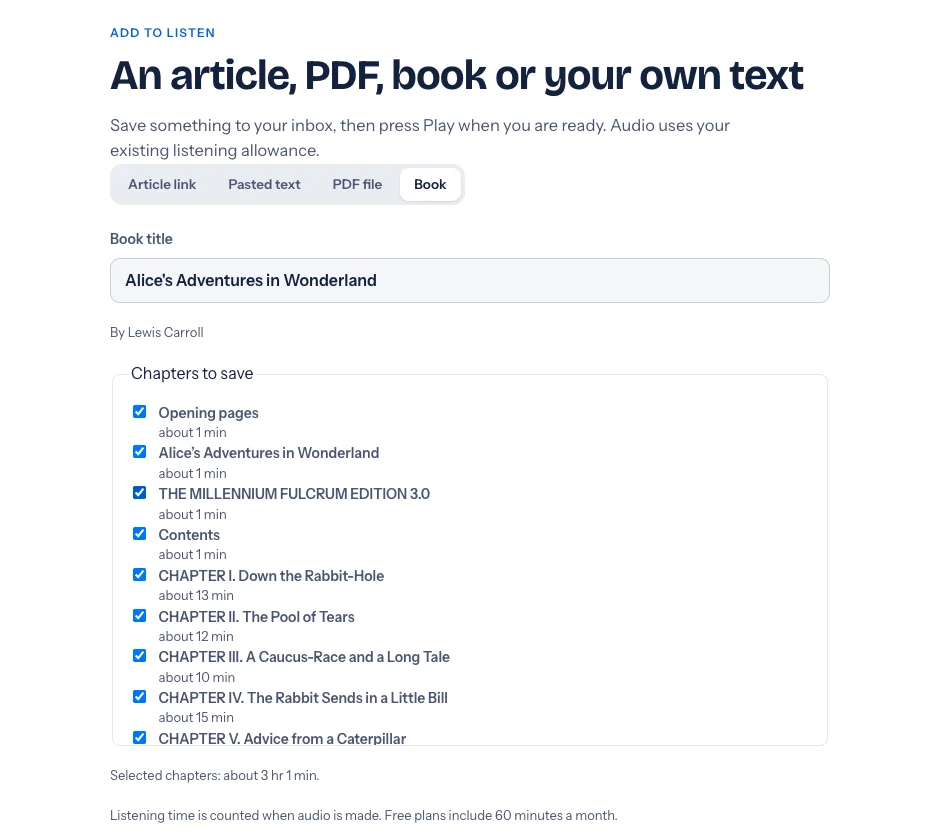
1. Open Add and choose Book
Sign in at app.spokeninbox.com, choose Add, then Book. Pick the EPUB and press Preview book.
2. Untick what you don't want to hear
The preview lists every chapter with its listening time, and your time left this month. Untick the copyright page, the table of contents and the license at the back. The book title you set becomes the sender name on every chapter.
3. Choose the reading language and where the chapters go
The Reading language comes from the book's own details, or English when it doesn't say. Add the chapters to Up next plays them in a row in the web, Windows or Mac app. Add the chapters to my podcast feed sends them to your podcast app. For the podcast feed, all the chapters you pick must fit the listening time you have left that month, or the app asks you to choose fewer.
4. Save and press Play
Choose Save. The chapters arrive in your inbox in reading order and play on every Spokeninbox app.
How an EPUB's chapters come out
Chapters follow the book's own table of contents, in reading order.
- Chapter names come from that table, captions and all, so Pride and Prejudice has a chapter called "He rode a black horse. CHAPTER III."
- Text before the first chapter becomes its own item, named after its first heading or "Opening pages".
- A chapter over 100,000 characters, about 1 hour 50 minutes, is split into "part 1", "part 2" and so on.
- Footnote marks such as [1] are dropped. Notes printed as text are read where they sit.
- Pictures aren't described, and tables are read as plain text.
When you need an MP3 or M4B file
For a USB stick, an MP3 player or Audiobookshelf, use a converter, since Spokeninbox has no file download. An M4B is one audiobook file with chapter marks.
- Audiobook Maker runs in the browser and takes EPUB or PDF. It makes an M4B or chapter MP3s, free with standard voices.
- ebook2audiobook is free software you install. It takes EPUB, MOBI or PDF, and is slow without a good graphics card.
- epub_to_audiobook makes one MP3 per chapter for Audiobookshelf, with free Microsoft Edge voices.
- AudiobookGen sends back files from $9.99 a book.
Limits
Spokeninbox isn't for you if you want audio files or a narrator who acts out characters. Its voices read evenly, so a novel full of accents is better as a human-narrated audiobook.
- EPUB or PDF up to 30 MB, 2,000,000 characters (about 37 hours) and 100 items after splitting.
- Nine reading languages: English, Spanish, French, Italian, Portuguese, Russian, Hindi, Japanese and Chinese.
For a PDF, see PDF to audiobook.
Questions
Can I convert a Kindle book to an audiobook?
Not if the book is copy protected (DRM), because converters and Spokeninbox can't open those. For some DRM-free titles, Amazon lets buyers download an EPUB or PDF copy, which you can import. Amazon's Assistive Reader reads Kindle books aloud in the Kindle apps, and Alexa reads them on an Echo speaker.
Can I listen to the book in Apple Podcasts or Overcast?
Yes. Turn on your private podcast feed, add it to your podcast app, and tick Add the chapters to my podcast feed when you import. Each chapter becomes an episode, made and counted right away, even if you never play it.
Can I listen on my iPhone or Android phone?
Yes. The chapters show up in the iPhone and Android apps, which play one chapter at a time. Only the import needs the web app, the Windows app or the Mac app from spokeninbox.com.
Do you keep my EPUB?
No. Spokeninbox keeps the text of the chapters you save, not the file.